


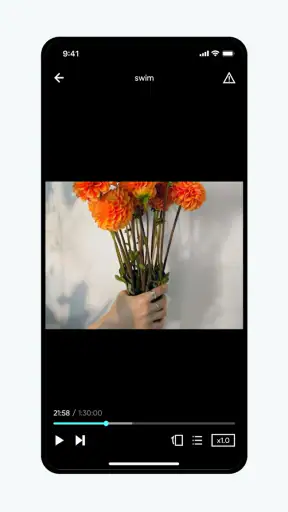
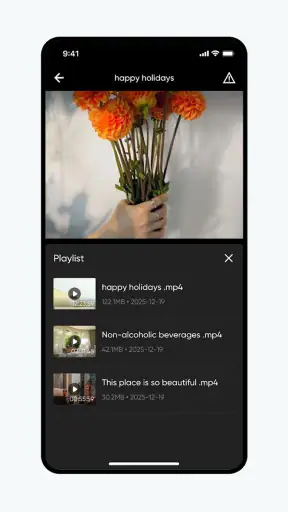
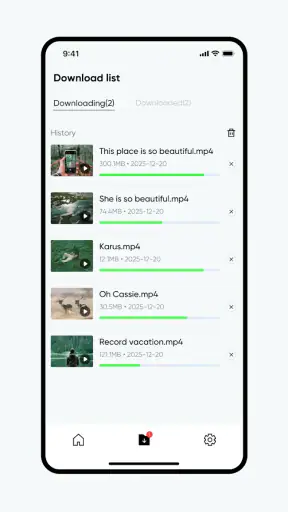
I approached Screxo as a straightforward video playback app rather than expecting it to replace a full editing suite or a feature-heavy media center. That distinction matters. Its store identity is deliberately simple, and my first impression was shaped by how quickly it lets me get from choosing a video to watching it. There is very little conceptual overhead: this is an app for opening and viewing video content, not for building a complicated library around it.
That simplicity gives it an appealing first-week experience. When I want to watch a clip without spending time learning a new interface, a focused player can feel more comfortable than a larger app packed with tools I will never touch. At the same time, the modest average rating of 3.3 from roughly four thousand ratings suggests that the uncomplicated idea does not automatically translate into a perfect experience for everyone. I would treat Screxo as a practical option to test, not as an automatic replacement for the player already on your phone.
What using Screxo feels like at the beginning
The opening appeal is easy to understand: Screxo stays close to its central purpose. Instead of asking me to organize a large collection, create an account, or learn a production workflow, it presents itself as a place to play video. For someone who mainly needs a quick way to view saved clips, downloaded material, or personal recordings, that narrow focus can be welcome.
I also like that the app is free to install. That makes trying it less of a commitment, especially when I am comparing it with the default player on an Android phone. The age rating is Everyone, so its basic positioning is accessible to a broad audience. The developer behind it is HK MILE, and the app has already passed the one-million-install mark, which gives it enough visibility to be more than an obscure experiment.
A realistic everyday situation would be watching a video someone sent me after I have moved it onto my phone. With a conventional player, I may already know where the file is and only need a clean viewing screen. Screxo makes sense in that moment because I am not looking for filters, timelines, captions editing, or publishing tools. I simply want to start playback, pause when needed, and return to the file later.
That same simplicity can become a weakness if your expectations are wider. People often use “video app” to mean several different things: a local player, a streaming service, a social feed, a video editor, or a casting tool. Screxo belongs most naturally to the playback side of that group. If you want to trim a recording, add music, create transitions, or publish directly to a social network, this is not the type of app I would choose.
The first week: useful habits rather than excitement
During the first few days, I would judge Screxo less by novelty and more by whether it removes small annoyances from watching videos. A good test is to use it with several kinds of personal content instead of only one favorite clip. Try a short recording, a longer video, and a file you do not normally open with your phone’s default player. The point is not to chase advanced options; it is to see whether the app remains predictable when your viewing routine changes.
One practical habit is to decide which videos genuinely belong in a dedicated player. If I use Screxo for every media file without thinking, it may not offer much beyond what is already installed. If I reserve it for a particular group of clips, such as offline recordings or files that the default application handles awkwardly, its role becomes clearer. That is a more sustainable reason to keep it than simply installing another player because it looks different.
I would also pay attention to how much tapping is required before playback begins. A player can appear minimal while still making basic actions feel hidden. The important questions are simple: can I find a file quickly, resume viewing without confusion, and leave the app without losing track of what I was doing? Those details determine whether the first-week convenience survives regular use.
My main caution at this stage is to avoid assuming that a clean first impression means the app covers every playback need. The store short description is simply “Screxo,” while its broader summary points to video playback. That tells me the product is intentionally light on explanation. I would therefore test it with my own files and routine before relying on it as my only player.
Does it earn a place after the novelty fades?
The harder question is not whether Screxo can play video once. It is whether I still have a reason to open it several weeks later. A dedicated player earns lasting space when it becomes the quickest, least irritating route to a recurring task. For me, that means the app must be dependable enough that I stop comparing it with alternatives every time I want to watch something.
There is a possible long-term role here for people whose viewing is local and uncomplicated. If your phone contains personal recordings, offline clips, or transferred videos, a focused playback app can remain useful because the need does not disappear. You are not using it for a temporary trend; you are using it as part of a repeatable routine. The value comes from reducing friction each time you return to the same kind of content.
However, Screxo is less compelling for users whose video life is mostly online. If most of your time is spent inside streaming platforms, social feeds, or cloud-based libraries, opening a separate player adds another step rather than removing one. In that case, the service that already contains your content will usually be more convenient, even if its playback screen is less minimal.
Another trade-off appears when comparing Screxo with a mature general-purpose media player. Established alternatives often support a wider range of formats, detailed playback controls, subtitles, network locations, casting, playlists, or audio-focused features. I would not assume Screxo matches that breadth simply because it plays video. Its appeal is its focused identity, while a larger player may be better when one app needs to handle many different media situations.
Where recurring value can come from
The strongest recurring value is consistency. A lightweight player can be useful when I do not want recommendations, feeds, notifications, or a large media ecosystem competing for attention. That is especially relevant for someone who watches instructional recordings, family videos, or saved material in short sessions. The app’s purpose stays close to the action I came to perform.
A second useful insight is that a separate player can help create a boundary around offline viewing. Instead of opening a social app and getting pulled into unrelated content, I can use a dedicated tool for a file I already chose. Screxo is not automatically a focus app, but its playback-centered identity makes that kind of intentional routine possible.
A third consideration is device age. The minimum operating system is Android 7.0, so people using older compatible phones may find the requirement manageable. That does not tell me how the app behaves on every device, but it does make Screxo relevant to users who are not running the newest Android release. I would still judge performance on the actual phone rather than assuming that a modest system requirement guarantees smooth playback.
There is also a financial distinction worth noticing. The app is free, but it includes in-app purchases ranging from $0.99 to $99.99 per item. That wide span makes it important to understand what, if anything, I would be paying for before treating the free installation as the complete experience. I would begin without purchasing anything, use the core player over normal weeks, and only consider an upgrade if it solves a specific recurring annoyance.
The maintenance burden of keeping it installed
Maintenance is where many simple apps quietly lose their place. A player may be easy to install but still become irritating if I must repeatedly reorganize files, dismiss interruptions, or remember which app handles which format. With Screxo, I would keep the maintenance test practical: after a few weeks, can I open it and reach the video I want without rebuilding my workflow?
My preferred approach would be to keep the app’s role narrow. I would not use it as a substitute for a complete photo library or cloud archive. Instead, I would let my phone’s normal file organization do the heavy lifting and use Screxo as the viewing layer. This reduces duplication and lowers the chance that I forget where a video was stored.
It is also sensible to review the app after an update rather than assuming the experience is unchanged. The current version is 3.0.1, and software can evolve in ways that affect navigation or the balance between free use and optional purchases. I would not update blindly if the app is central to an important offline collection; I would first make sure my files remain easy to locate and that the new version still fits my routine.
For people who share a device, maintenance may involve expectations as much as files. A family member may want a player that explains itself immediately, while another person may expect advanced controls. Screxo’s straightforward positioning could help with basic viewing, but it may not satisfy everyone who wants a highly customized media setup. In a shared environment, a broader player may reduce the need to switch between applications.
I would also avoid making Screxo the only place where important videos can be accessed. A playback app is not the same thing as a backup system. Keeping original files organized elsewhere is a sensible precaution, particularly for personal recordings that would be difficult to recreate. That advice is not a criticism of Screxo; it is simply the difference between watching a file and preserving it.
Small checks that prevent long-term frustration
Before settling on Screxo, I would run a short personal checklist. Open the types of videos I actually watch, close and reopen the app, and see whether returning to an unfinished clip feels natural. I would also check whether the interface remains comfortable during both quick sessions and longer viewing. These tests reveal more than an isolated successful playback.
I would then compare the result with the phone’s built-in player, not with an imaginary perfect application. If Screxo saves steps, opens files more reliably for my use, or keeps me away from distractions, it has earned a place. If it merely duplicates the default experience while adding another icon and another update cycle, I would uninstall it without feeling that I had missed anything.
Finally, I would watch the purchase prompts during ordinary use. The presence of optional items does not make the app poor, but the value depends on whether those purchases address a real need. A one-time convenience may be reasonable for a frequent viewer; a large purchase would need a much clearer long-term benefit. I would not pay simply to make a basic player feel complete unless the improvement was obvious in daily use.
What may cause fatigue over time
The first source of fatigue is repetition without added value. If every video opens just as easily in an existing player, Screxo may feel like an unnecessary duplicate after the initial curiosity wears off. A dedicated app needs to be noticeably better at a particular task, not merely capable of performing it.
The second is uncertainty about scope. Because the product presents itself so briefly, a new user may expect more than playback and then feel disappointed when looking for editing, sharing, or library features. I would set expectations correctly from the start: this is best evaluated as a video viewer, not as an all-purpose video workspace.
The third is the gap between a free entry point and optional spending. Users who dislike in-app purchases may find the range from $0.99 to $99.99 uncomfortable, especially if they are not sure what the paid items change. My advice is to use the free portion long enough to establish a routine, then make a purchase only for a clearly understood benefit. If the free experience regularly interrupts the task, another player may be a better fit.
There is also the fatigue of switching contexts. A local player is useful when the file is already on the device, but it becomes less attractive when I need to jump between online services, cloud storage, editing tools, and messaging apps. In those situations, a larger ecosystem may be less elegant but more efficient because it keeps related actions together.
The rating of 3.3 is another reason I would approach Screxo with measured expectations. It is not a verdict on my own phone or files, but it signals that the experience has not been universally smooth for the people who rated it. I would test the exact workflow I care about instead of relying on popularity alone. The one-million-plus install count shows reach, while the rating reminds me that reach and satisfaction are different things.
Who should choose it, and who should skip it
I can recommend trying Screxo to someone who wants a focused way to watch local video content, dislikes clutter, and is willing to judge the app through everyday use rather than through a long feature checklist. It may also suit an owner of an older compatible Android device who wants a current playback option without needing the latest operating system.
I would point frequent editors elsewhere. If your routine includes cutting clips, adding effects, adjusting sound, or exporting finished projects, a dedicated editor will be a better match. I would also steer heavy media collectors toward a mature player with deeper library and format management if those capabilities are central to their day.
Streaming-first viewers should probably stay with the services they already use. Screxo becomes most relevant when the video is already available as a file and the main job is watching it. That boundary is important: the app can be useful without being the right answer for every kind of video consumption.
For families or shared devices, I would make the choice based on the least technical user. If everyone only needs basic playback, its focused approach may be comfortable. If one person expects advanced controls while another needs a richer catalog view, a more established alternative may create fewer compromises overall.
My long-term verdict
After the first-week appeal fades, Screxo’s case depends on a specific habit: opening a dedicated app whenever I want to watch videos already stored on my device. That is a real use case, but it is narrower than the broad label “video app” might suggest. I appreciate the focused direction, yet I would not keep it installed merely because it is free or because it has attracted a large audience.
The best way to decide is to give it a defined trial in your own routine. Use it for the files you regularly watch, compare the number of steps with your default player, and notice whether it reduces distractions or simply adds another layer. Do not begin with optional purchases. First establish whether the basic experience saves time month after month.
My recommendation is cautious but positive for the right person. Screxo is worth trying when simple video playback is the whole requirement and a clean, separate viewing habit sounds useful. It is not the choice I would make for editing, streaming discovery, advanced media management, or a single app expected to handle every format and workflow.
In the end, lasting space on a phone has to be earned through repetition. Screxo has a plausible place for local viewing, but its long-term value is practical rather than exciting. If it becomes the dependable shortcut for your personal videos, keep it. If the default player already does that job without friction, the honest choice is to move on. Its strongest feature is focus, and its biggest risk is having too little beyond that focus to justify permanent space.


